
Project Overview
A U.S.-based veteran claims consulting business needed a custom software solution to support its VA disability claim document workflow. Their work involved reviewing large volumes of veteran-related documents, including medical records, service treatment records, VA rating decisions, denial letters, C&P exam records, personal statements, buddy statements, and other evidence connected to disability claims.
The client wanted a system that could help their internal team analyze documents, identify missing evidence, review potential claim gaps, and generate structured draft documents such as Nexus Letters, GAP Analysis reports, claim workbooks, support statements, and VA form-related outputs.
Power Soft was brought in to design and develop a custom AI-powered desktop application that could support this workflow before moving toward a future web-based platform.
Client Background
The client works in the U.S. veteran disability claim support space. Their process requires careful review of VA claim evidence, medical records, prior denials, rating decisions, condition lists, and supporting documentation.
This type of work is document-heavy, detail-sensitive, and time-consuming. A single veteran file can include hundreds or even thousands of pages. The client needed a system that could help organize this workload and produce structured outputs faster while still allowing human review and professional judgment.
The Challenge
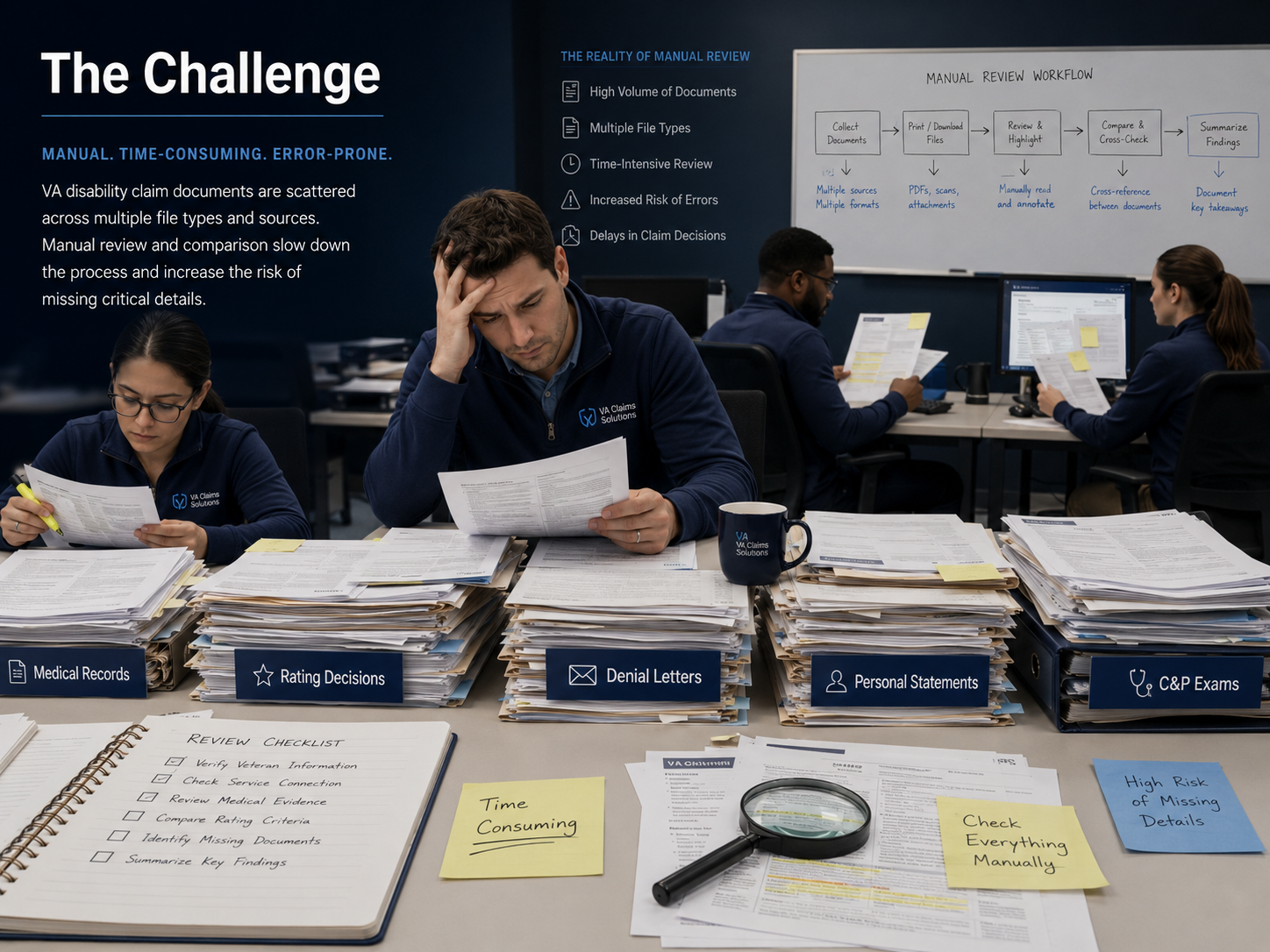
The client’s existing process depended heavily on manual review and external AI tools. This created several operational problems.
First, the team had to read and compare large medical records manually. VA medical records and Blue Button reports can be extremely long, sometimes exceeding 1,000 to 2,000 pages.
Second, different document types required different outputs. A Nexus Letter draft is not the same as a GAP Analysis. A claim workbook is not the same as a support statement. Each output needed its own structure, logic, tone, and evidence focus.
Third, the client needed the system to understand condition-specific logic. For example, PTSD, sleep apnea, migraines, tinnitus, lumbar back issues, sinusitis, and other conditions require different claim analysis patterns.
Fourth, the output quality had to improve over multiple rounds of feedback. The client wanted stronger medical reasoning, better citation formatting, more professional document formatting, provider credential placeholders, clearer rating analysis, and more useful guidance for veterans.
Fifth, performance became a major challenge. Large PDF files and badly encoded PDFs slowed down OCR processing. Some files were selectable PDFs, some were image-based, and some had encoding issues even though they looked readable to a user.
Project Objectives
Power Soft’s objective was to build a desktop application that could:
- Allow users to upload VA claim-related documents.
- Extract text from PDF files using OCR when needed.
- Process both readable and image-based documents.
- Detect or work with veteran conditions from the uploaded files.
- Generate GAP Analysis reports.
- Generate Nexus Letter drafts.
- Generate claim workbooks.
- Support personal statements, buddy/support statements, and VA form-related outputs.
- Allow condition customization when AI-generated condition names were not ideal.
- Improve document formatting for professional Word/PDF-style outputs.
- Support larger file processing through performance optimization.
- Create a foundation for a future web-based version.
The Solution
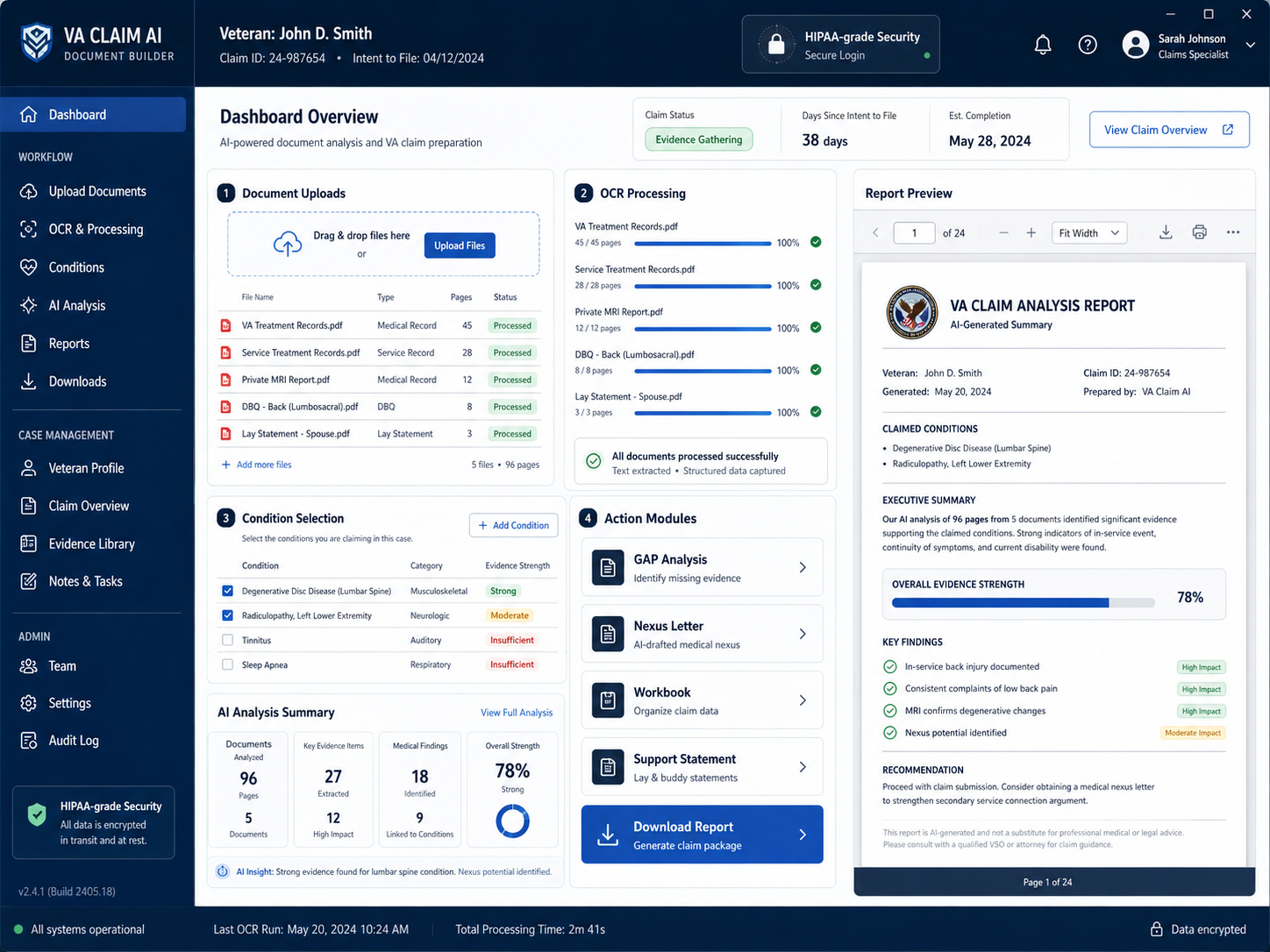
Power Soft built a custom desktop-first AI document processing application. The system was designed to combine document upload, OCR, AI analysis, prompt-based report generation, and downloadable output files inside a controlled workflow.
The first version focused on proof of concept. After initial testing, the project evolved into a desktop application so the client’s team could use it internally, test real claim files, and refine the logic before moving into a public web version.
Core Application Workflow
1. Document Intake
The user uploads claim-related documents such as medical records, rating decisions, denial letters, personal statements, C&P exam notes, and other supporting files.
2. OCR and Text Extraction
The system extracts text from uploaded PDFs. For readable PDFs, it processes embedded text. For image-based or scanned PDFs, it uses OCR. Later performance improvements were added for large and difficult PDF files.
3. AI Analysis Preparation
The extracted text is structured and passed into AI prompt workflows. Different report types use different prompt logic.
4. Condition Selection and Customization
The system identifies possible conditions from records. Based on client feedback, condition handling was improved so similar condition names could be merged or manually customized.
5. Report Generation
The user can generate different document outputs, including:
- GAP Analysis
- Nexus Letter draft
- Claim workbook
- Personal statement
- Support statement
- Buddy letter style content
- VA form-related support documents
- Denial analysis and claim improvement guidance
6. Downloadable Output
Generated reports are prepared in clean, structured document formats for review, editing, and further use by the client’s team.
Key Features Developed
AI-Assisted GAP Analysis
The GAP Analysis module helps review claim documents and identify what evidence appears present, what may be missing, what claim theories may need improvement, and what next steps could help strengthen a claim.
The system was refined to produce clearer, more structured sections with bullets, condition-based analysis, and action-focused outputs.
Nexus Letter Draft Generation
The Nexus Letter module generates structured draft letters based on uploaded evidence and selected conditions. The system supports placeholders for provider name, credentials, qualifications, and professional details, reducing the risk of fabricated information.
The output was refined to include stronger reasoning around “at least as likely as not,” medical logic, evidence review, and condition-specific narrative.
Claim Workbook Generation
The workbook module was designed to help veterans better understand what their current evidence supports, why a specific rating may apply, and what evidence may be needed for the next higher rating.
The workflow was improved after client feedback to prevent condition mismatch and to better align workbook content with the selected condition.
Support Statement and Buddy Letter Assistance
The application supports draft generation for lay statements, buddy statements, and support statements. The system can use case patterns and evidence context to help organize statements around observable symptoms, functional impact, and claim relevance.
VA Form-Related Output
The system included support for VA form-related document generation, especially for mental health-related workflows where structured form assistance was needed.
Large PDF OCR Processing
A major part of the project involved improving OCR performance for long VA records. The team worked on handling large files, difficult PDF encoding, stalled OCR processes, and performance bottlenecks.
GPU acceleration was later implemented to improve OCR speed significantly for very large files.
API Security and Login Improvements
The application included login/session handling, API security updates, password change functionality, and setup/version updates as the project matured.
Technical Architecture
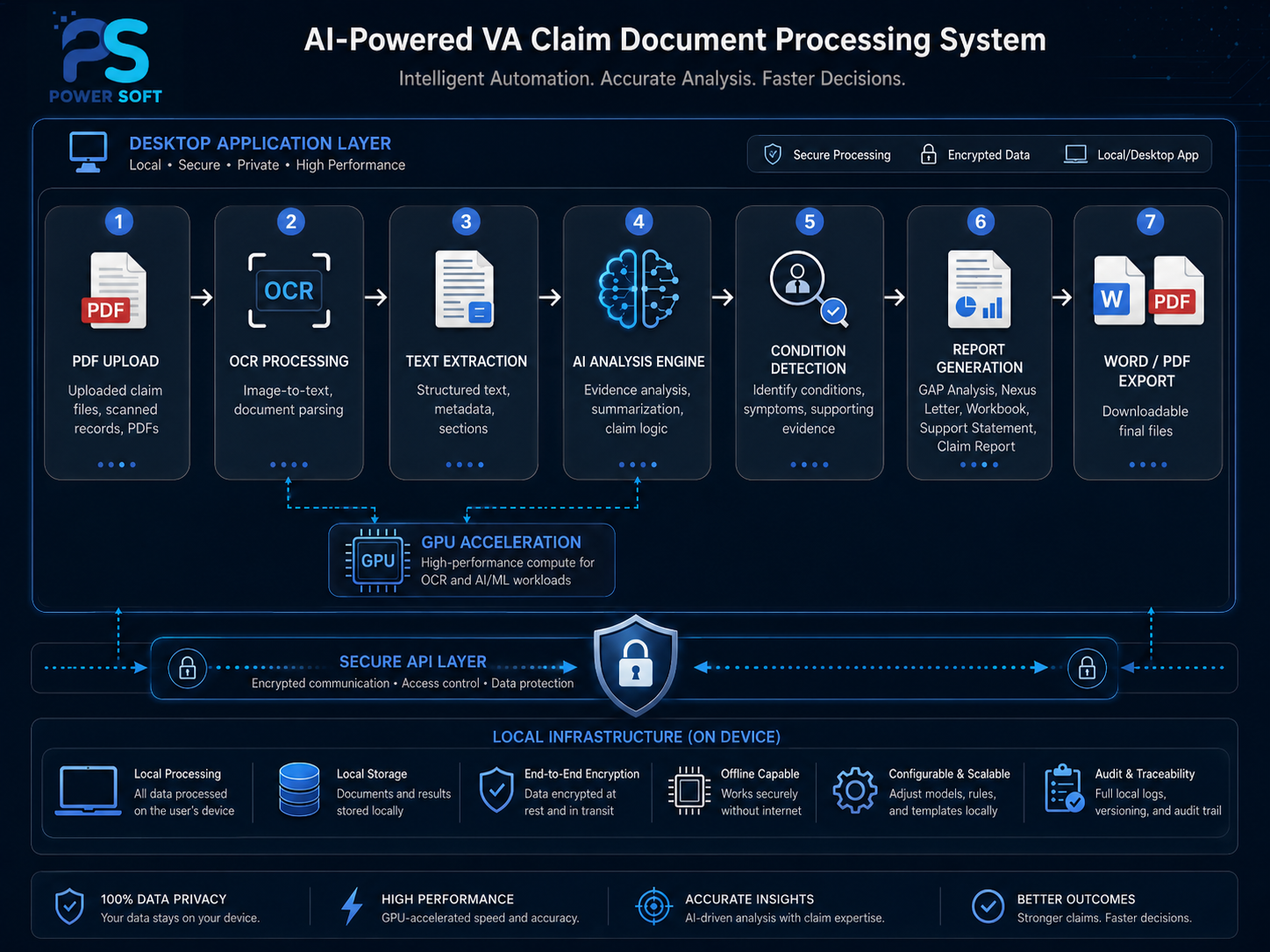
The project involved several technical layers.
Desktop Application Layer
The client needed a desktop-first solution before launching a web version. This allowed internal testing, real client file processing, and faster iteration.
OCR Processing Layer
The OCR pipeline handled text extraction from different PDF types, including selectable PDFs and image-based/scanned PDFs.
AI Processing Layer
Different prompt blocks were designed for different report types. This was important because a Nexus Letter, GAP Analysis, workbook, and support statement each require different reasoning patterns and formatting.
Document Generation Layer
The system generated structured outputs that could be exported and reviewed by the client’s team.
Performance Optimization Layer
Large files created processing delays. Power Soft analyzed CPU-based processing limitations, explored GPU acceleration, and implemented faster OCR processing for large documents.
Development Process
The project moved through several practical stages.
Stage 1: Requirement Discovery
Power Soft reviewed the client’s existing VA claim workflow, example outputs, sample Nexus Letters, document types, and desired report formats.
Stage 2: Proof of Concept
The first POC focused on document upload, OCR, AI prompt processing, and Nexus Letter generation.
Stage 3: Desktop Application Direction
After testing the early workflow, the client requested a desktop version first. The purpose was to let the internal team use the tool before building a web-based subscription platform.
Stage 4: Report Type Expansion
The system expanded from Nexus Letter generation into GAP Analysis, claim workbooks, support statements, buddy letters, VA form support, and denial analysis.
Stage 5: Prompt and Formatting Refinement
Power Soft adjusted prompts, formatting, section structure, citation style, provider placeholder logic, and document layout based on detailed client feedback.
Stage 6: OCR Performance Improvement
The team handled multiple PDF challenges, including large records, badly encoded PDFs, stalled OCR, and slow CPU-based processing. GPU acceleration was introduced to improve performance.
Stage 7: Stabilization and Future Web Planning
The desktop milestone created the foundation for a future web version, including the need for stronger hosting, separated services, GPU-supported OCR, API services, and scalable architecture.
Main Problems Solved
Problem 1: Manual document review was too slow
The application helped automate the first layer of document extraction, evidence review, and report drafting.
Problem 2: Different VA claim documents needed different logic
Power Soft separated report types so each document could follow its own workflow, structure, and purpose.
Problem 3: AI outputs needed domain-specific refinement
The system went through multiple prompt refinements for VA claim reasoning, Nexus language, rating explanation, support statement structure, and evidence gap identification.
Problem 4: Large PDF processing created bottlenecks
The OCR workflow was improved to better handle large VA records and later enhanced with GPU acceleration.
Problem 5: The client needed a desktop system before SaaS
The desktop app allowed the client to test real workflows privately before investing in a larger public web platform.
Business Impact
The desktop application gave the client a practical internal tool for processing veteran claim documents more efficiently.
The system helped the client move from scattered manual analysis and external AI usage toward a centralized workflow where documents could be uploaded, processed, analyzed, and converted into structured draft outputs.
It also created a technical foundation for a future web-based version, which could later support a broader SaaS or client-facing workflow.
Results and Outcomes
- Built a functional desktop application for VA claim document workflows
- Implemented OCR-based document extraction
- Supported large PDF document processing
- Added AI-assisted GAP Analysis
- Added Nexus Letter draft generation
- Added claim workbook generation
- Added support statement and personal statement workflows
- Added condition customization
- Improved professional report formatting
- Added API security and login/session improvements
- Implemented GPU acceleration for faster OCR processing
- Created a foundation for future web version development
Important Compliance Note
This application is designed to support document organization, evidence review, and draft preparation. It does not replace licensed legal, medical, or accredited VA claims representation. Final documents, medical opinions, Nexus Letters, and claim strategies should always be reviewed by qualified professionals before use.
Why Power Soft Was the Right Partner
This project required more than simple software development. It required understanding a complex document workflow, translating real-world claim processing into structured software logic, integrating AI carefully, managing large document processing, and continuously improving outputs based on expert feedback.
Power Soft delivered value through custom software engineering, AI workflow development, OCR integration, performance optimization, and long-term product thinking.